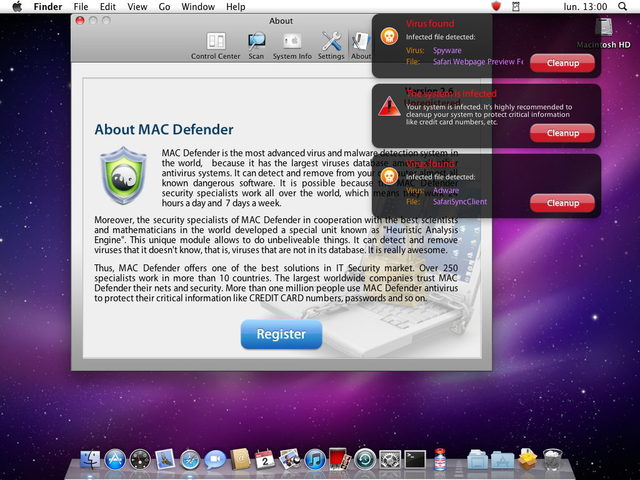
Virus “appears” to make everything vanish.

Wednesday, June 8th, 2011

Don’t Panic! First off there is a good chance your files are still there. A variation of the rogue antivirus programs that have been plaguing Windows and now Mac operating systems is playing hide and seek with your data. The tough part is when people can’t see their files, they assume all is lost and subsequently reformat their drive and reinstall their operating system in order to have a functional computer again. Before you take that drastic step, which will destroy your data call us at Computer Doctor and we will diagnose the problem and secure your data, then remove the Virus for you.

Did we mention now is the time to start a disaster recovery plan! There are many ways to implement a successful disaster plan to recover from hardware failure, loss or software corruption. Don’t roll the dice with your files, all hard drives fail we just don’t know when…

Mac-Defender: A shot across the bow, an apple virus.

Thursday, June 2nd, 2011

Mac "Rogue Antivirus" Malware

While virus’s for mac’s have been around for along time, they are generally few and very far between. I have said on countless occasions one of the best ways to prevent a Virus infection on your computer is to use a Mac. While I still stand by this, for now, the tide may be turning. Mac Defender is rogue antivirus program which has been running rampant as of late. These programs have been infecting PC’s for years and work by trying to get you to purchase a fake product and enter your credit card info. Your information is compromised, the program is now embedded in your system and can cause a host of issues, from performance issues to hard drive corruption and data loss.

There is nothing I have found as of yet that will offer 100% protection from all virus infections, barring of course staying off the internet and never connecting a usb drive or installing any software or sharing files. Given the connected nature of business and the ever growing social aspect of inter connectivity staying off the web is out of the question for most of us.

So what are we to do? Look before you click! Question everything! Read the URL for your search result, crank up your spam filter. Keep your antivirus program up to date, your windows/mac os updated and the nagging adobe and java updates, just do them…

This is a wake up call, back up everything you don’t want to lose, put data on a separate drive, not inside the computer! Use an online back up service such as carnbonite or mozy and once again, there is no such thing as a free lunch, free programs exact a toll on your system, whether poorly written, or worse, being laden with spyware or carrying a keylogger or virus. Your browsing habits are valuable, as is the information and business you do online. Be smart and when you run into problems. Call me…

Computer Doctor on Vacation!

Wednesday, May 4th, 2011

Computer Doctor will be on vacation starting May 5th and returning May 23rd. I can be reached via email kevin@oldersite.hampdencomputer.com. Please check in with my travel blog England 11′ to follow my adventure in England. I will be traveling with my brother and father through the midlands of England. We will be exploring the canal system on a Black Prince Narrowboat holiday.

Black Prince Canal Boat


the Five stages of data loss grief

Friday, April 29th, 2011

So your hard drive just died, and you didn’t back it up. I’m so, so sorry. You can expect to go through the following five stages once you discover that all of your photos, files and music are gone forever.

Stage one: Denial
“No. No, there’s no way. This is probably just a software issue, maybe if I try rebooting again it’ll work. I’ve only had this hard drive for two years, there’s no way it just died. I’ll get all that stuff back. This silly computer always freaks out but is fine after a reboot. Even though I’ve tried rebooting five times and it sounds like a fork is stuck in a garbage disposal in there, it’s probably just the CD drive.”

Stage two: Anger
“Are you kidding me, Western Digital? I’ve lost everything! I trusted you, and for what? How does a company that sells such crappy products stay in business? I will murder the first WD employee I see. And what the hell is wrong with me that I didn’t back this stuff up? I am the biggest idiot in the world and I want to punch myself in the face. I hate myself and don’t deserve to be happy.”

Stage three: Bargaining
“OK, so maybe I can download some software and boot this drive as a secondary drive and try to recover some stuff. I mean, I’ll have to go buy a new hard drive and install it and then figure out how to hook this one up as a secondary drive, and I’m not sure where my OS discs are, but hey, I’m a smart guy, I can figure this stuff out, right? Or maybe professional data recovery services have gotten much, much cheaper lately. Yeah, I’ll bet they’re affordable now, they’ve gotta be.”

Stage four: Depression
“All those photos. I’ll never, ever get them back. I’ll never see those faces again. And my essays from college, I was going to share those with my kids someday. And man, all that music, it’s taken me years to collect all that. Why did I even bother? It’s like the last ten years of my life have just been erased.”

Stage five: Acceptance
“Ah, none of that stuff was that important. Most of it was uploaded to various sites like Flickr, anyways. At least the really important stuff. Regathering all that music will be fun, too! And hey, you know what? Maybe it’s good to start fresh every once in a while. And man, hard drives have gotten a lot cheaper since I last bought one. This is really just a good way to put things in perspective; none of this stuff was all that important. Except for those photos. Why the hell didn’t I back them up?”

Anti-Virus 101

Thursday, March 10th, 2011

Below is some excellent information provided by the US Department of Homeland Security US-CERT Security TIP

What does anti-virus software do?

Although details may vary between packages, anti-virus software scans files or your computer’s memory for certain patterns that may indicate an infection. The patterns it looks for are based on the signatures, or definitions, of known viruses. Virus authors are continually releasing new and updated viruses, so it is important that you have the latest definitions installed on your computer.

Once you have installed an anti-virus package, you should scan your entire computer periodically.

  • Automatic scans – Depending what software you choose, you may be able to configure it to automatically scan specific files or directories and prompt you at set intervals to perform complete scans.
  • Manual scans – It is also a good idea to manually scan files you receive from an outside source before opening them. This includes:
  • saving and scanning email attachments or web downloads rather than selecting the option to open them directly from the source
  • scanning media, including CDs and DVDs, for viruses before opening any of the files

What happens if the software finds a virus?

Each package has its own method of response when it locates a virus, and the response may differ according to whether the software locates the virus during an automatic or a manual scan. Sometimes the software will produce a dialog box alerting you that it has found a virus and asking whether you want it to “clean” the file (to remove the virus). In other cases, the software may attempt to remove the virus without asking you first. When you select an anti-virus package, familiarize yourself with its features so you know what to expect.

Which software should you use?

There are many vendors who produce anti-virus software, and deciding which one to choose can be confusing. All anti-virus software performs the same function, so your decision may be driven by recommendations, particular features, availability, or price.

Installing any anti-virus software, regardless of which package you choose, increases your level of protection. Be careful, though, of email messages claiming to include anti-virus software. These messages, supposedly from your ISP’s technical support department, contain an attachment that claims to be anti-virus software. However, the attachment itself is in fact a virus, so you could become infected by opening it (see Using Caution with Email Attachments for more information).
How do you get the current virus information?

This process may differ depending what product you choose, so find out what your anti-virus software requires. Many anti-virus packages include an option to automatically receive updated virus definitions. Because new information is added frequently, it is a good idea to take advantage of this option. Resist believing email chain letters that claim that a well-known anti-virus vendor has recently detected the “worst virus in history” that will destroy your computer’s hard drive. These emails are usually hoaxes (see Identifying Hoaxes and Urban Legends for more information). You can confirm virus information through your anti-virus vendor or through resources offered by other anti-virus vendors.

While installing anti-virus software is one of the easiest and most effective ways to protect your computer, it has its limitations. Because it relies on signatures, anti-virus software can only detect viruses that have signatures installed on your computer, so it is important to keep these signatures up to date. You will still be susceptible to viruses that circulate before the anti-virus vendors add their signatures, so continue to take other safety precautions as well.

Tablet Talk

Saturday, February 26th, 2011

Phone screen to small to meet all your needs? Laptop or netbook to bulky to carry? You may be ready to delve into the latest tech rage of tablet computing…

Apple had been rumored to be developing a tablet device since the days of its Newton line of PDA’s. With the release of the iPad it has started a juggernaut of tablet development. Much more than a Nook or Kindle, the tablet device has great potential for those who would benefit from what it does well and whose form factor fits in with their lifestyle. Small, light and dazzling, navigating pages effortlessly with a casual flip of the wrist, tablets must be experienced first hand to really get an appreciation for how they work and what they do. Pinching, zooming, auto screen rotation, multitouch features, while there is a lot of hype, there is just as much function and convenience if you need and will use it.

Sure the uber geek factor is tremendous, pulling out a tablet device in any social or business situation will always generate attention, but its when you start harnessing its power and not just checking Facebook that the devices truly begin to shine.

Tune in next week as we talk more about tablet devices and the “apps” that live on them.